



I’m letting the community know that the ASUS USB-N10 Nano works!
- Login o registrati per inviare commenti

Hello everyone.
I’ve just discovered that the ASUS USB-N10 Nano Wi-Fi adapter works with Trisquel.
It’s a very compact Wi-Fi adapter.
The website https://h-node.org/ states that it does NOT work with free software distributions. THIS IS INCORRECT!
https://h-node.org/wifi/catalogue/en/1/1/ASUSTek-Computer-Inc./undef/undef/undef/wifi-works/undef
does it work with free software?
no
The adapter I’m testing has an RTL8192CU chip. Below is a photo of the box.
During testing, I’ve noticed a few errors, but I haven’t looked into them yet; everything is working fine at this stage,
the adapter is detected straight away and you can connect to the internet.
~$ sudo dmesg
[  267.175324] usb 1-3.1: USB disconnect, device number 5
[  267.194632] rtl_usb: reg 0x102, usbctrl_vendorreq TimeOut! status:0xffffffed value=0x83040000
[  267.194656] rtl_usb: reg 0x422, usbctrl_vendorreq TimeOut! status:0xffffffed value=0x0
[  267.194674] rtl_usb: reg 0x542, usbctrl_vendorreq TimeOut! status:0xffffffed value=0x4d5
[  267.194722] rtl_usb: reg 0x102, usbctrl_vendorreq TimeOut! status:0xffffffed value=0x390272a
[  271.518458] usb 1-3.1: new high-speed USB device number 6 using xhci_hcd
[  271.644826] usb 1-3.1: New USB device found, idVendor=0b05, idProduct=17ba, bcdDevice= 2.00
[  271.644846] usb 1-3.1: New USB device strings: Mfr=1, Product=2, SerialNumber=3
[  271.644855] usb 1-3.1: Product: 802.11n WLAN Adapter
[  271.644863] usb 1-3.1: Manufacturer: Realtek
[  271.644869] usb 1-3.1: SerialNumber:
[  271.647850] rtl8192cu: Chip version 0x10
[  271.681350] rtl8192cu: Board Type 0
[  271.681425] rtl_usb: rx_max_size 15360, rx_urb_num 8, in_ep 1
[  271.681448] rtl8192cu: Loading firmware
[  271.681470] ieee80211 phy1: Selected rate control algorithm 'rtl_rc'
[  271.682337] usb 1-3.1: Direct firmware load failed with error -2
[  271.682399] usb 1-3.1: Direct firmware load failed with error -2
[  271.682403] rtlwifi: Loading alternative firmware
[  271.682404] rtlwifi: Selected firmware is not available
[  271.694436] rtl8192cu 1-3.1:1.0 : renamed from wlan0
[  271.763121] rtl8192cu: MAC auto ON okay!
[  271.776113] rtl8192cu: Tx queue select: 0x05
[  272.283515] rtl8192c_common: Polling FW ready fail! REG_MCUFWDL:0x00000006.
[  272.283518] rtl8192c_common: Firmware is not ready to run!

[  127.837715] ================================================================================
[  127.837744] UBSAN: array-index-out-of-bounds in /build/linux-Zomprl/linux-5.15.0/drivers/net/wireless/realtek/rtlwifi/rtl8192cu/trx.c:502:15
[  127.837759] index 12 is out of range for type 'rtl_tid_data [9]'
$ hwinfo --usb | grep -i  network
  Hardware Class: network
  Model: "ASUSTek N10 Nano 802.11n Network Adapter [Realtek RTL8192CU]"
  Device: usb 0x17ba "N10 Nano 802.11n Network Adapter [Realtek RTL8192CU]"
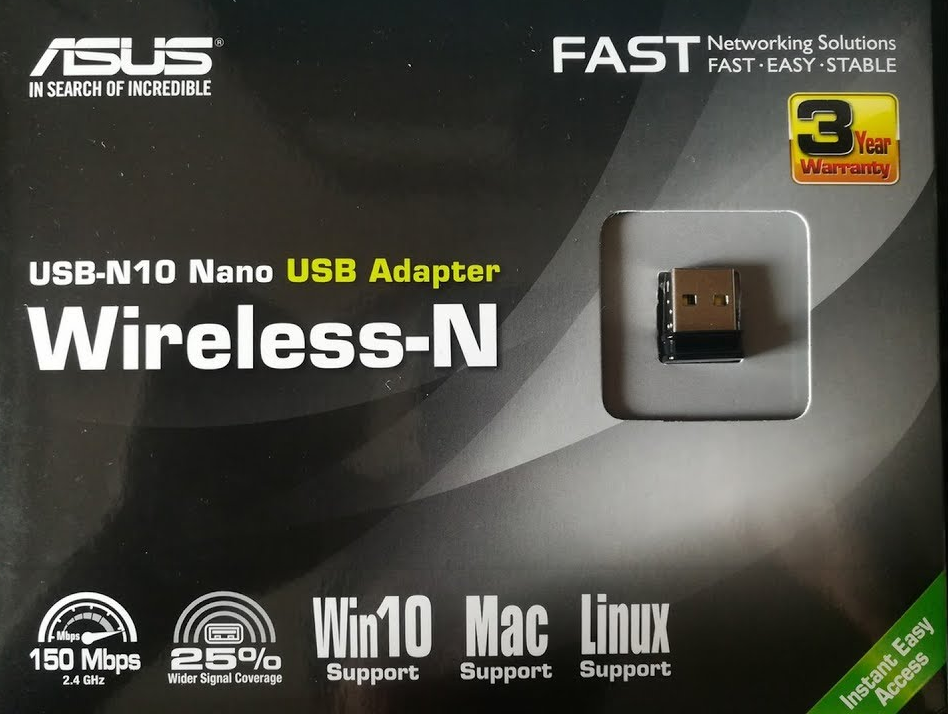

The link you provided is from a different product (0b05:1786) with another chipset (RTL8188SU):
https://linux-hardware.org/?id=usb:0b05-1786
I added your device (0b05:17ba) here:
https://h-node.org/wifi/view/en/2455/ASUSTek-N10-Nano-802-11n-Network-Adapter--Realtek-RTL8192CU-/1/1/undef/undef/undef/undef/wifi-works/undef

I recommend changing "Does it work with free software?" to no. The information we've seen so far is that the device fails to initialize, the network interface is down, and doesn't have an IP address so it can't be routing traffic. Further, the computer in question has a second network interface which is known to work with free software. It's highly probable that this secondary interface is silently providing the network access, creating a false positive for the Asus device. Without being able to see any information at all, even the requested redacted output from ip a, to demonstrate the status of the other network interface, the available evidence we've seen so far shows this network interface is not functioning.
Indeed. I changed it to "no" for now.
Edit:
I found a post from March 2025 and it states that this chipset still needs nonfree firmware.
https://dwaves.de/2025/03/09/debian-13-wifi-usb-adapter-trouble-edimax-works-d/
Therefore, RTL8192CU does not work with free software!
Hello Icarolongo.
Thank you very much for sharing a copy of my photo.
I’d like to clarify something with you, as I don’t understand the logic behind the statement you wrote:
RTL8192CU does not work with free software!
If I plug in an ASUS USB-N10 Nano USB adapter (RTL8192CU) and can use Trisquel, PureOS, Parabola and Hyperbola – the ISOs I’ve tested – and as you can see in the photo, everything works perfectly!
When I plug in, for example, an ASUS adapter with an RTL8188EU chip, I simply cannot get a connection because the drivers are not compatible.
Everything works for me (as shown in the screenshot), but you’re telling me it doesn’t work – how am I supposed to understand that?))
Hi Icarolongo,
I tested it again on a clean system, updated the system and kernel using an Ethernet cable, and plugged in the ASUS Wi-Fi adapter – it worked straight away without any issues.
I think you need to change the description back to:
RTL8192CU WORKS with free software!
If you think I’ve made all this up and faked the screenshot using artificial intelligence )), please go to a shop, buy this adapter with this chip and check it for yourself.
I’ll be waiting for confirmation.
The advantage of this adapter is that it’s very easy to buy for $5–10.
P.S I don't understand why Jason thinks that I get the Internet from another adapter))
Anyone can check it, but don't make a mistake with the chip.
The reality is: you can't prove it works.
Now you have used Ethernet to get the connection.
Hi Icarolongo,
Thanks for your reply; I wanted to understand the logic behind your reasoning.
So, if I used an Ethernet cable (not Wi-Fi) to connect to the internet to update the kernel, and then plugged in a Wi-Fi adapter that shouldn’t work—but it does—does that mean I haven’t passed the test?
So, a miracle happened after I plugged in the cable?))
I have another Wi-Fi adapter for the test, an ASUS USB-N10 B1 with an 8188EUS chip, which I bought by mistake, thinking it would work; but when I plug it in, it doesn’t work AT ALL, no matter what I do.
If you don’t believe me, you can buy one for $5–10 and check for yourself, or write clear instructions on how to do this without revealing the user’s personal details, as Jason suggested.
You said it worked on Trisquel 11 (Linux-libre 5.15) and Trisquel 12 (Linux-libre 6.8). And now you needed the Ethernet cable to update to Linux-libre 7.0.
Almost 50 messages in this thread for nothing.
No additional conversation is required: RTL8192CU does not work with free software. It still needs the nonfree firmware to get a internet connection.
Hi Icarolongo,
Why say it’s pointless?
I had the Trisquel 11 ISO and checked it – everything worked fine.
Then I checked the Trisquel 12 ISO and everything worked there too; then Jason asked me to check Linux-libre 7.0 across all variants with different kernels. Did you know about this?
I don’t understand what you mean by saying that the RTL8192CU doesn’t work with free software??
How can you write that when you don’t even physically have this adapter and haven’t tested it?
I’ve attached a few screenshots showing that it works, yet you’re saying it doesn’t.
I gave you an example with the ASUS USB-N10 B1 adapter, which really doesn’t work, whereas the RTL8192CU does.
If you’re saying that the RTL8192CU doesn’t work with Trisquel 11 and 12, can you explain to me how I’m getting internet via Wi-Fi?

> using an Ethernet cable
When you test the rtl8192cu usb wifi card is the ethernet cable disconnected from the computer?
If you do an off line install of trisquel 12 and after installing trisquel connect the rtl8192cu usb wifi card to the computer does the rtl8192cu usb wifi card then work?
Hi Tonlee .
Thank you for your reply.
As for the offline installation, I won’t have the Linux-libre 7.0.0-gnu kernel in that case.
The kernel developer, Jason, asked me to test it on the latest kernel, and I did.
But it doesn’t matter; everything works without installing the latest kernel.
As for the Wi-Fi module, I physically removed it from the test computer.
Hi Icarolongo,
I performed a clean install again, without using Ethernet, and plugged in an adapter with an RTL8192CU chip; the Wi-Fi didn’t work, but when I loaded the kernel module from Linux-libre using the command:
$ sudo modprobe rtl8xxxu
the adapter started working.
If loading the rtl8xxxu module from Linux-libre is a problem, then the user has nothing to do with it in this case.
The adapter with the ath9k chip worked straight away and I didn’t need to load the kernel module.
Hello icarolongo.
Thank you very much for your reply and help.
You were right last time: the ABSENCE of the chip’s name on the box confuses users when they buy an adapter, especially online.
As for the description on h-node.org, I won’t argue with you )) but I’m sure that
no user would have bought the ASUS USB-N10 if they’d seen that
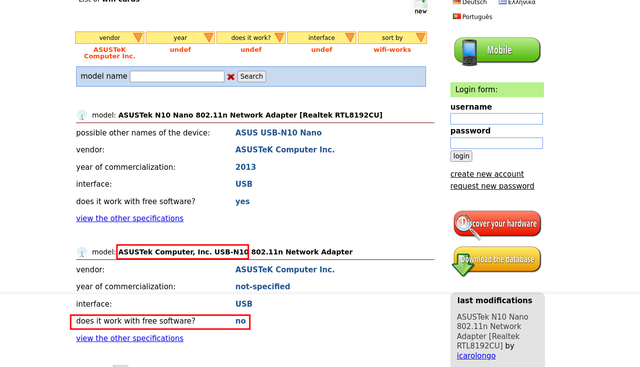
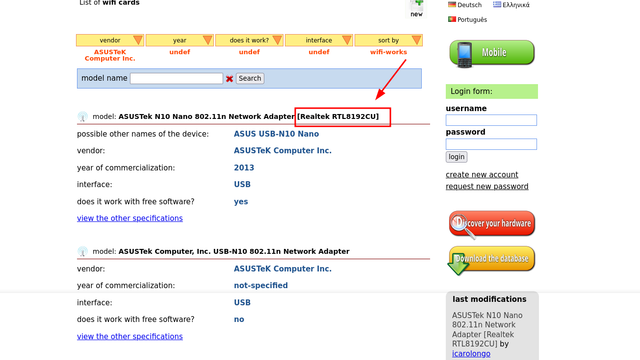
In my view, the right solution would be to specify the chip name as you did in my example; this clearly indicates the chip type IMMEDIATELY.
I wanted to ask you if there are any studies on chips for mini USB adapters? Which of the chips is more reliable, etc.
For example, the ath9k or rtl8188cus or rtl8192cu, etc.
The logs you posted actually seems like the adapter is being detected as a USB device, but it failed to initialize. Can you share the output of ip a?
Hi Jason.
Yes, I noticed some kind of anomaly in the logs and a kernel-related error, but everything’s working fine, which is why I asked about the chip tests.
The AI wrote about all these errors))
Right, I’ll show you the results a bit later today.
$ uname -rs
Linux 5.15.0-107-generic
$ cat /etc/os-release
NAME="Trisquel GNU/Linux"
VERSION="11.0.1, Aramo"
ID=trisquel
ID_LIKE=debian
PRETTY_NAME="Trisquel GNU/Linux Aramo (11.0.1)"
VERSION_ID="11.0.1"
VERSION_CODENAME="aramo"
UBUNTU_CODENAME="jammy"
HOME_URL="https://trisquel.info/"
SUPPORT_URL="https://trisquel.info/wiki"
BUG_REPORT_URL="https://gitlab.trisquel.org/trisquel"
PRIVACY_POLICY_URL="https://trisquel.info/legal"
$ rfkill list
8: phy8: Wireless LAN
	Soft blocked: no
	Hard blocked: no
$ modinfo rtl8192cu
filename:       /lib/modules/5.15.0-107-generic/kernel/drivers/net/wireless/realtek/rtlwifi/rtl8192cu/rtl8192cu.ko
firmware:       rtlwifi/rtl8192cufw_TMSC.bin
firmware:       rtlwifi/rtl8192cufw_B.bin
firmware:       rtlwifi/rtl8192cufw_A.bin
firmware:       rtlwifi/rtl8192cufw.bin
description:    Realtek 8192C/8188C 802.11n USB wireless
$ ip -c a
wlx10c37bcce69e:  mtu 1500 qdisc mq state DOWN group default qlen 1000
$ lsusb | grep -i ASUS
Bus 001 Device 009: ID 0b05:17ba ASUSTek Computer, Inc. N10 Nano 802.11n Network Adapter [Realtek RTL8192CU]
testl@trisquel:~$ sudo dmesg
[  174.562464] usb 1-3.1: new high-speed USB device number 7 using xhci_hcd
[  174.688773] usb 1-3.1: New USB device found, idVendor=0b05, idProduct=17ba, bcdDevice= 2.00
[  174.688794] usb 1-3.1: New USB device strings: Mfr=1, Product=2, SerialNumber=3
[  174.688804] usb 1-3.1: Product: 802.11n WLAN Adapter
[  174.688811] usb 1-3.1: Manufacturer: Realtek
[  174.688817] usb 1-3.1: SerialNumber:
[  174.695243] rtl8192cu: Chip version 0x10
[  174.729813] rtl8192cu: Board Type 0
[  174.729883] rtl_usb: rx_max_size 15360, rx_urb_num 8, in_ep 1
[  174.729934] rtl8192cu: Loading firmware
[  174.729976] ieee80211 phy2: Selected rate control algorithm 'rtl_rc'
[  174.731080] usb 1-3.1: Direct firmware load failed with error -2
[  174.731225] usb 1-3.1: Direct firmware load failed with error -2
[  174.731234] rtlwifi: Loading alternative firmware
[  174.731238] rtlwifi: Selected firmware is not available
[  174.744500] rtl8192cu 1-3.1:1.0 wlx10c37bcce69e: renamed from wlan0
[  174.785149] rtl8192cu: MAC auto ON okay!
[  174.795824] rtl8192cu: Tx queue select: 0x05
[  175.299254] rtl8192c_common: Polling FW ready fail! REG_MCUFWDL:0x00000006.
[  175.299257] rtl8192c_common: Firmware is not ready to run!

"wlx10c37bcce69e: mtu 1500 qdisc mq state DOWN group default qlen 1000"
Your USB wifi is down.
Hello Tonino.
Everything works!
This is just an example interface => wlx10c37bcce69e
The problem is that the wwlx10c37bcce69e interface should be renamed to wlan0, but it doesn't.
"The problem is that the wwlx10c37bcce69e interface should be renamed to wlan0, but it doesn't."
That's actually an intended feature of the kernel to provide predictable network interface names. Your logs show this happening as intended:
[ 174.744500] rtl8192cu 1-3.1:1.0 wlx10c37bcce69e: renamed from wlan0
If your internet is working, the traffic is routing through a different network interface because the output shows that the interface in question's in a "down" state. That means it has no IP address and can't pass traffic. The log also shows that the device failed to initialize, which is probably why it's down. Could you run ip a and post the *entire* output instead of just the one line? Absolutely everything, uncensored. That will show us exactly what's providing your active connection.
Hi Jason.
I’ve checked other distro ISOs; the interface only stays the same in Trisquel and PureOS. For example, in ParabolaOS, I see `wlan0` when I plug in the adapter.
If this is a feature and the kernel code renames the `wlx10c37bcce69e` interface to `wlan0`, then it isn’t working.
It’s the same situation with the adapter using the ath9k driver.
As for the adapter (ASUS USB-N10), it works 200%. I’ve written three times that everything works, yet you’re saying it doesn’t))
I wouldn’t want to publish my IP address and other personal information publicly, and I don’t think it’s very ethical to ask for that))
I would never do that to any user.
I see that the distro has been updated (Trisquel 12) and it’s now officially available for download; I’ll try testing the adapter on it and let you know if there are any issues with changing the interface.
It makes complete sense that you are seeing the exact same naming situation with your ath9k adapter. That actually confirms it is an intended system feature, not a bug. In Ubuntu-based systems like Trisquel, a tool called udev specifically renames the interface from wlan0 to the wlx... name. It’s a feature called Predictable Network Interface Names: https://www.freedesktop.org/wiki/Software/systemd/PredictableNetworkInterfaceNames/ If you don't see that in other distros, it may not be in use there.
Since you mentioned having an ath9k adapter, that explains why your internet is working. Atheros chips run perfectly on 100% free software. Because your logs show the other adapter failing to initialize and sitting in a state DOWN, your ath9k adapter is almost certainly the one actually providing your internet connection.
If you're concerned about IP address and/or MAC address, you can just replace those values with zeroes before posting the otherwise-complete output of ip a.
Hi Jason
Thanks for explaining about udev.
As for the Wi-Fi adapters, I tested them individually.
Perhaps I didn’t express myself clearly, but I plugged each adapter in separately. Below is a photo showing the ASUS USB-N10 Nano in action.

The image shows as broken. I'm more interested in what the OS has to say. First, note the name of the active interface from your ip a output. It will be the one that says state "UP" and has an IP address assigned to it. Can you share that data? You can of course redact the IP address with zeroes because we don't actually care about that piece of data. Let's assume the active interface is named wlan0. Then, do ethtool -i wlan0 or whatever name that ip a says is "UP" with an IP address. Look at the very first line of the output, which says driver:. What does it say? If you don't have ethtool installed, you can install it with sudo apt install ethtool.
Hi Jason.
The service I was using doesn't work well, so you can't see my photo. Here I am attaching the photo again.

Litterbox https://litterbox.catbox.moe/
Litterbox is a temporary file upload service that allows you to upload files up to 1GB. Choose whether to have your files expire in 1, 12, 24, or 72 hours. Similar to Catbox - 100% free, no ads, and no throttling
I uploaded the image here on the Trisquel forum.
sam-d16, can you try with the GNU Linux-libre Freesh repository?
https://www.fsfla.org/ikiwiki/selibre/linux-libre/freesh.en.html
Please could you clarify what you mean? Write down the commands; I didn’t understand.
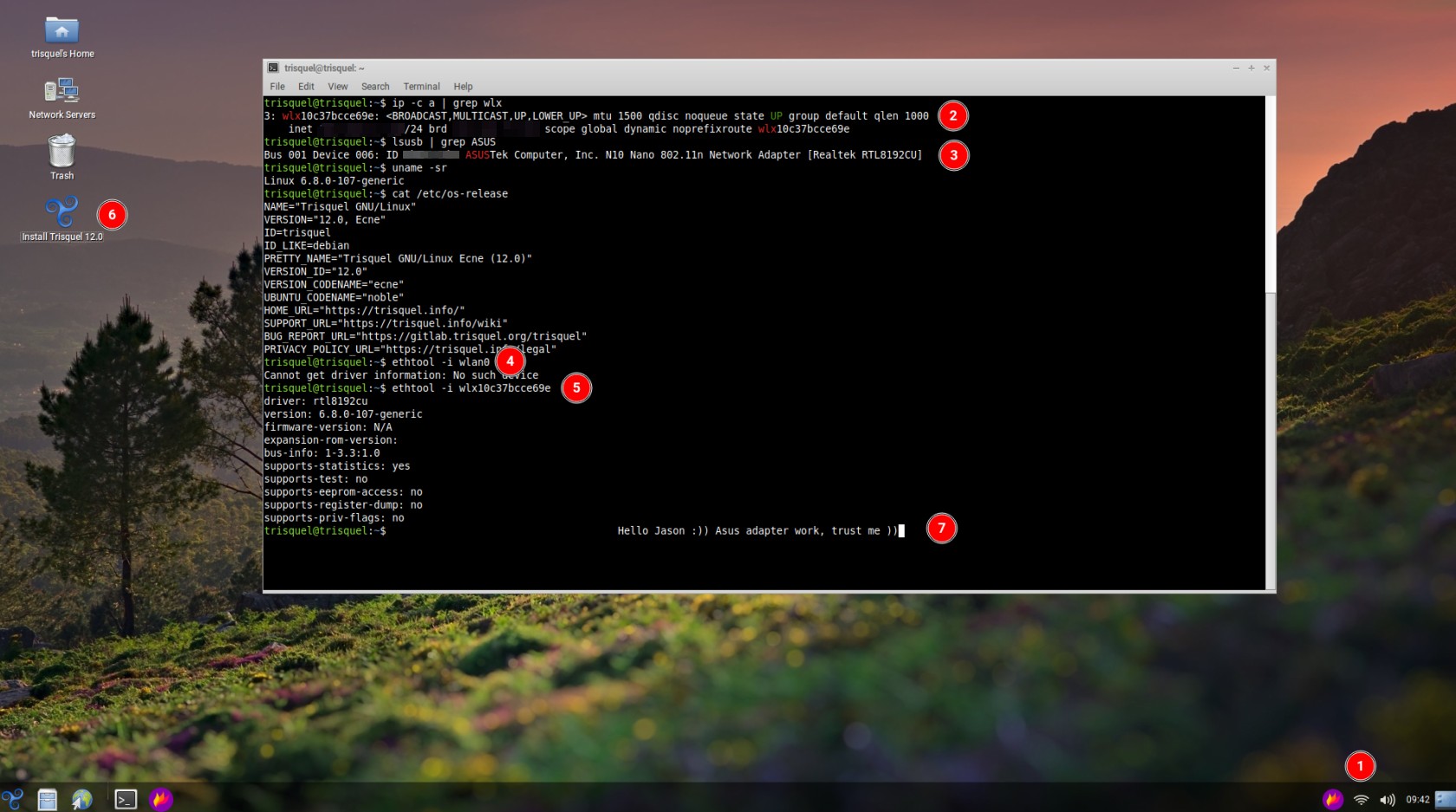
I updated the ISO repository, plugged in the adapter, connected to the internet and took a screenshot.
It's a reference to replacing the Trisquel kernel:
https://www.fsfla.org/ikiwiki/selibre/linux-libre/freesh.en.html
The commands are there. Then, once that's all done, install the latest version of Linux-libre (7.0-gnu) and repeat your same output from the screenshot.
First, this will only work with Trisquel installed, not Live USB/DVD.
wget https://linux-libre.fsfla.org/pub/linux-libre/freesh/pool/main/f/freesh-archive-keyring/freesh-archive-keyring_1.3_all.deb
sudo dpkg -i freesh-archive-keyring_1.3_all.deb
sudo apt update
sudo apt install linux-libre
After the installation, reboot your system and see the kernel version.
uname -a
Thanks so much for reminding me—I’ve attached a screenshot proving five times over that I was right))
This adapter ASUS USB-N10 (RTL8192CU) is physically half the size of the TPE-N150USB https://www.thinkpenguin.com/gnu-linux/penguin-wireless-n-usb-adapter-gnu-linux-tpe-n150usb, 10 times cheaper than the TPE-N150USB, and 100 times easier to buy.
Since no one has posted any information about technical tests for these adapters, it’s hard to tell which one works better.
"If this is a feature and the kernel code renames the `wlx10c37bcce69e` interface to `wlan0`, then it isn’t working."
It is the opposite, wlan0 is renamed to a different name with the MAC address of the adapter, like wlx10c37bcce69e on your system.
The output you posted says that your AsusTek USB wifi adapter is down, it is not working with Trisquel 11 and something else is providing networking to your system. Maybe it will work on Trisquel 12 with kernel 6.8.
> I wouldn’t want to publish my IP address and other personal information publicly, and I don’t think it’s very ethical to ask for that))
Rightfully so. He should have told you to redact any pieces of information you deem private.
> you’re saying it doesn’t))
Regarding free software usb wifi cards, there are few of them. And if a person introduces what he believes to be a so far unknown free software usb wifi card then people get skeptical. I am quite sure people's skepticism is not directed towards you. People find it difficult to believe that we do not already know about all free software usb wifi cards.
Not sure about this particular chipset - I wasn't aware that Realtek had any WiFi cards that didn't need proprietary firmware. But I have a Realtek ethernet controller and it complains when it doesn't find the firmware, but works nonetheless.
Now you can be sure and use this adapter, do not confuse the boxes when buying, I specifically showed what the box should be. 99% of sellers do not know what chip this adapter has.
In this example, I used ISO Trisquel Aramo (11.0.1) to test the work of the adpter.

looking at the box, I assume no 5GHz support, right? too bad, but understandable.
Hi arielenter,
I don’t know of any Wi-Fi adapters or network cards that support 5 GHz and WPA3. If you do, please provide a link from the website https://h-node.org
I don't know how true it is, maybe some one can commend, but there is something on the forum:
https://trisquel.info/es/forum/recommendation-usb-wifi-adapter-supports-5-ghz
Hi Arielenter,
Thank you very much for the useful link and information.
The adapters look just like a TV remote control)) but I reckon you can buy one in the village.

 I am a translator!
Someone confirmed that the following USB wifi adapters work on 5GHz with free software:
https://wikidevi.wi-cat.ru/Netgear_WNDA3200
https://wikidevi.wi-cat.ru/Sony_UWA-BR100
https://wikidevi.wi-cat.ru/Panasonic_N5HBZ0000055
Hi Avron,
Thank you very much for your useful links; I’ll need to buy a couple of adapters while they’re still in stock.
Hi Jason.
What you wrote piqued my curiosity, Icarolongo (I recommend changing “Does it work with free software?” to “no” … It’s highly likely that this secondary interface secretly provides network access, which causes a false positive for the Asus device....)
Can you admit that you were wrong and that you were in the wrong?

Thanks, sam-d16.
I uploaded the image again here on the Trisquel forum.
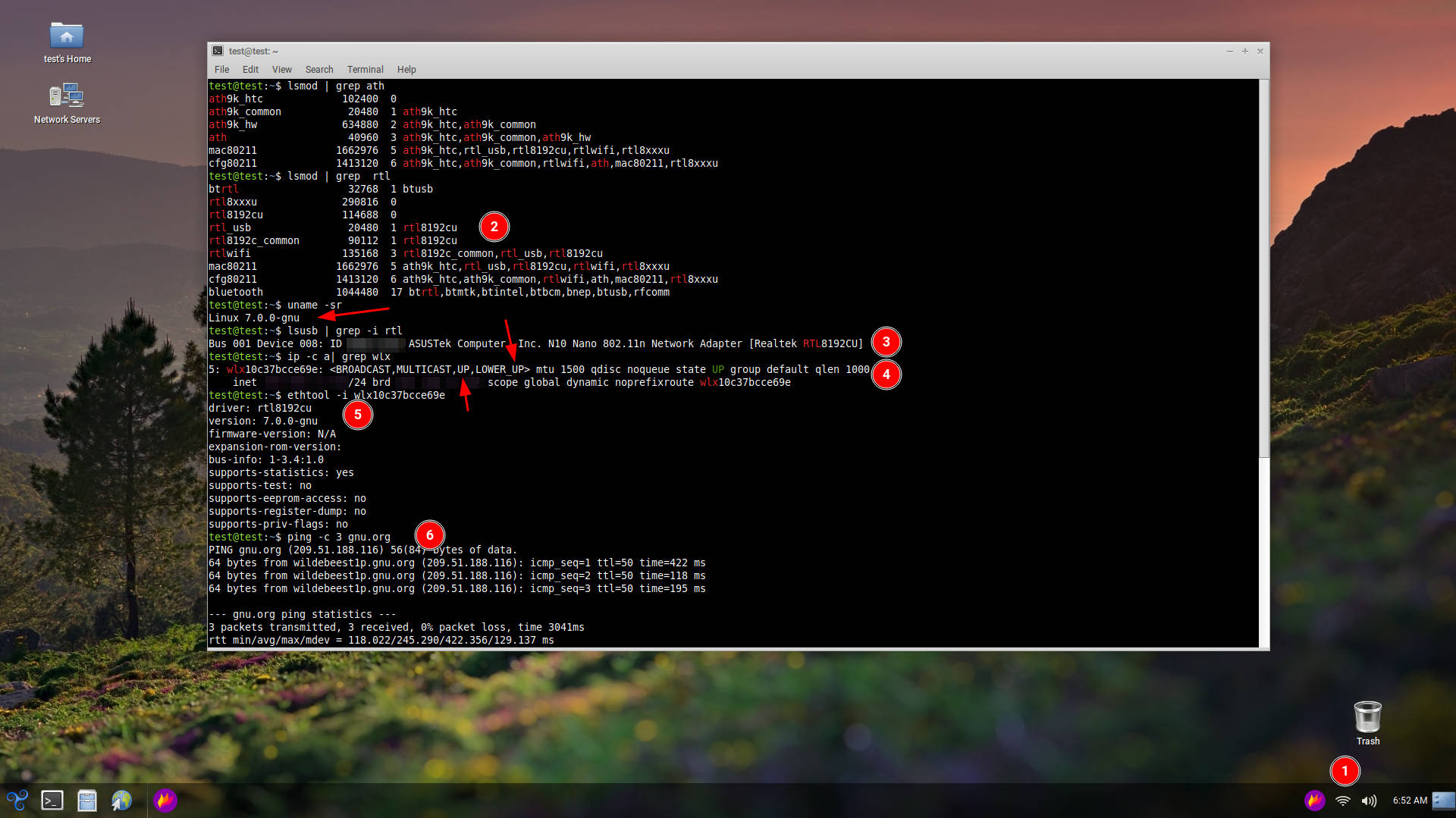
The status of the wlx10c37bcce69e interface from your own data originally stated it was "DOWN":
mtu 1500 qdisc mq state **DOWN** group default qlen 1000
[Citation] https://trisquel.info/en/forum/i%E2%80%99m-letting-community-know-asus-usb-n10-nano-works#comment-182930
(Asterisks added for emphasis)
The conclusion that the device was not functioning was 100% correct according to the data you originally provided. Since this was pointed out, your new data now says the interface is "UP". So the data itself has changed. Did you manually force the link state "UP"? Because it originally wasn't. Simply forcing an interface "UP" doesn't mean it's actually passing traffic.
But really, thank you for the screenshot! It clears up exactly what's happening here and confirms why you're able to reach the internet:
#1: An Atheros adapter is in use: Trisquel uses udev to handle automatic module loading when the kernel detects a hardware device. The very first command in your screenshot (lsmod | grep ath) proves that the ath9k_htc module is loaded. This means a free-software-compatible Atheros USB Wi-Fi adapter has been plugged into this machine during this session.
#2: The Asus adapter has no firmware: Look at the ethtool output in your own screenshot right next to red circle #5. It explicitly states firmware-version: N/A, which confirms that the firmware did not load.
#3: The network output is filtered: Running ip -c a | grep wlx filters the output to only show the Asus adapter. This hides the output for any other network interfaces (like the Atheros adapter we know is loaded into memory via lsmod), preventing us from seeing which interface is actually handling the traffic.
#4: The ping test is a networking illusion: Seeing a successful ping to gnu.org just proves that the computer itself has an internet connection, not that the Asus adapter is providing it. Because lsmod confirms an Atheros module is loaded, ping gnu.org will automatically route your traffic through whatever working connection is available. If you wanted to prove the Asus adapter was doing the work, you would have needed to perform this test on a fresh boot without the Atheros adapter ever being plugged in (so that lsmod shows the module is unloaded), show the full output of ip a (without hiding the other network interfaces), and run ping -I wlx10c37bcce69e gnu.org so that it goes over that interface and none other.
I'm leaving this breakdown here so that the h-node maintainers and any future Trisquel users researching this hardware have the information. I consider this matter resolved and won't be replying further.
Hi Jason,
Thanks for your reply.
Now I understand why you’re such a brilliant hacker and developer )) Your determination is impressive.
Right, I’m ready to continue with the test to ensure it’s a clean test.
I’d like to reiterate that I have two Wi-Fi adapters for the test: one has an ath9k chip and the other an RTL8192CU.
When I installed a clean system, I first inserted the adapter with the ath9k chip and then the RTL8192CU adapter; I did this so that I could first check what was supposed to work, and then test the other adapter.
I didn’t know that I should insert the RTL8192CU first and then the ath9k.
As for the commands:
$ lsmod | grep ath
$ lsmod | grep rtl
I wanted to show that the modules were loaded.
My test computer doesn’t physically have a Wi-Fi network module; when you write that the internet is going through some other adapter, I’m very surprised. I have no intention of deceiving anyone; on the contrary, I want to provide information.
What do you want me to do to convince you that this adapter works?
> My test computer doesn’t physically have a Wi-Fi network module
Your computer has no pci wifi card? Have you disassembled your computer and verified there is no pci wifi card in the computer?

Well, I would be doubtful too.
It's easier that something went wrong on the kernel cleaning process than some device start working out of the blue when is known to require non-free firmware.
Now, when firmware is activated, it can survive reboot if no complete removal of power source is enforced.
Does that mean it works with free software, not sure really, it's just that there are tangential factors moving around the issue itself.
Thank you for keep digging to the bottom of it. o/
Hi Ark74,
And thank you very much for your answer and thoughts. I will try to install a clean system again, install linux-libre (linux 7.0.0 gnu) and after installation insert the adapter with the RTL8192CU chip first and see what happens and write here.
Hi Ark74,
Thank you for your reply.
So does Parabola have the same issues with kernel cleaning?
I’ve checked on ParabolaOS as well, and everything works there too.
> So does Parabola have the same issues with kernel cleaning?
I can't tell.
As I said before, I believe that booting Trisquel with the vanilla FSFLA's linux-libre kernel after complete shutdown (plugging the power cable) might be one of the best test.
Other than that I can only imagine.