



DVD Video won't play in VLC
- Inicie sesión o regístrese para enviar comentarios

Thinkpad X200, Trisquel Release 9.0.2, Etiona 64-bit
Greetings,
I have been trying to play a DVD video, using VLC but it won't work.
The disk is a region 2 and works with Win 7 but won't work with Linux Trisquel & Linux antiX.
I use a Toshiba portable supermulti dvd drive.
VLC is 3.0.8 vetinari on X200.
When the video is started manually from desktop folder the result is pictured.
Never had any trouble with VLC before.
-just tried several other DVD videos, region 1 & 2, with the same result.
Does VLC need updating ?
| Adjunto | Tamaño |
|---|---|
| Screenshot at 2022-11-18 17-39-50.png | 116 KB |

Sorry, but Linux isnt the name of the GNU Operating System with Linux added. Instead please say GNU with Linux or just GNU for make it short.
If you dont understend this, or dont care about it please consider be under the Community Guidelines. https://trisquel.info/en/wiki/trisquel-community-guidelines
Read please the value #2 Avoid certain misnomers and propaganda terms. www.gnu.org/philosophy/words-to-avoid.html

You are perhaps missing libdvdcss to decrypt the DRM on the DVD?
And yes, you're mostly using the GNU Operating System. Richard Stallman started working at the MIT Artificial Intelligence Lab in the early 1970s and later started the GNU Project. With that he launched the free software movement - a social, ethical & political movement for software to be controlled by those who used it. Learn more about the history: https://www.gnu.org/gnu/thegnuproject.html


You are perhaps missing libdvdcss to decrypt the DRM on the DVD?
If so, it can be downloaded from https://packages.ubuntu.com/focal/all/libdvd-pkg/download
The package has been downloaded but where should it be extracted to ? I tried with synaptic and terminal but can't seem to make it work. thanks.

El 2022-11-20 07:40, name at domain escribió:
> The package has been downloaded but where should it be extracted to ?
> I tried with synaptic and terminal but can't seem to make it work.
Did you try "sudo apt install name_of_package"?
Yes but I get;
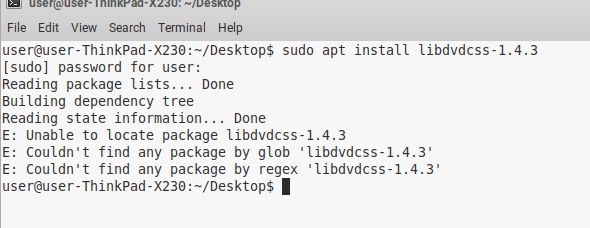
If you have downloaded the .deb try: sudo dpkg -i /path/to/deb/file
The method you're using of invoking apt only works for programs that are included with the Trisquel repositories, not for installing your own programs on the side.
libdvdcss and libdvd-pkg are not in Trisquel's repository. You should be able to simply double-click on the file (named libdvd-pkg_1.4.2-1-1_all.deb) that you downloaded and then on the button "Install Package" in the GDebi window that opens.
I finally downloaded the correct package after noticing that it was a tar.bz2 and not a .deb in the download folder.
All working now and I can watch DVDs.
Thanks for the help with my GNU/Linux Trisquel VLC issue.
I spoke too soon. It works on the X230 but fails to install on the X200. Trisquel is up to date.
Is it this lintian thing ?

Have tried installing with GDebi and Terminal but, 'libdvd-pkg_1.4.2-1-1_all.deb' will not install into my Thinkpad X200. Nor will the other versions of libdvd.
DVDs play on the X201 Win 7 pro laptop and the X230 GNU/Linux/Trisquel laptop.
Not working on X200 GNU/Linux/Trisquel, X60 AntiX/Linux, Lenovo Ideapad 3 Win 11.
I've tried the VLC site and a couple of other sites, but have not found a magic key to unlock the sealed gates of DVD playback.
Do you still have "broken packages"? For instance does the "Synaptic Package Manager" list some (filter behind the button "Custom Filters", in the bottom-left corner of the window)? Have you tried to remove them?
There are no broken packages (X200). Something I've noticed, on both the Trisquel machines: When they're first started, the notice pops up that informs me it's online, and if the software updater link is clicked it will fail to show the available updates.
I always need to start a browser first to check I'm online and then start the System/Admin/Software Updater. The updater won't work before the browser. Strange because it did before a few updates ago. Updating the server list won't fix this. Would this have anything to do with the libdvd problem ?
Is the error still that of https://trisquel.info/files/Screenshot%20at%202022-11-21%2013-54-33.png ?
Yes it is.
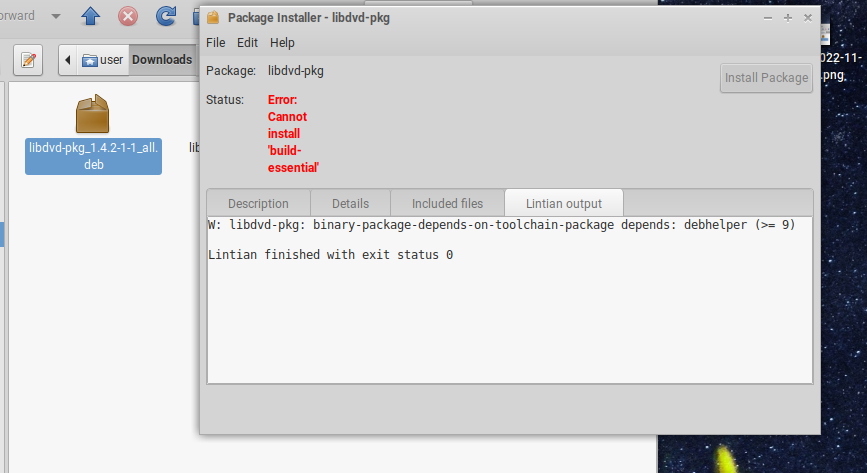
But now that no package on your system is broken, the error APT reports when you try to install build-essential must be different from that in https://trisquel.info/files/Screenshot%20at%202022-11-22%2017-46-55.png
What is it?
It's still giving the same response.

I'm just going round in circles with my complete lack of understanding of gnulinux at the terminal level. Have looked about online and tried a few things but nothing worked.
This is libdvd stuff installed. Also no broken packages according to synaptic.
And I can't install build essential until the broken packages are fixed.


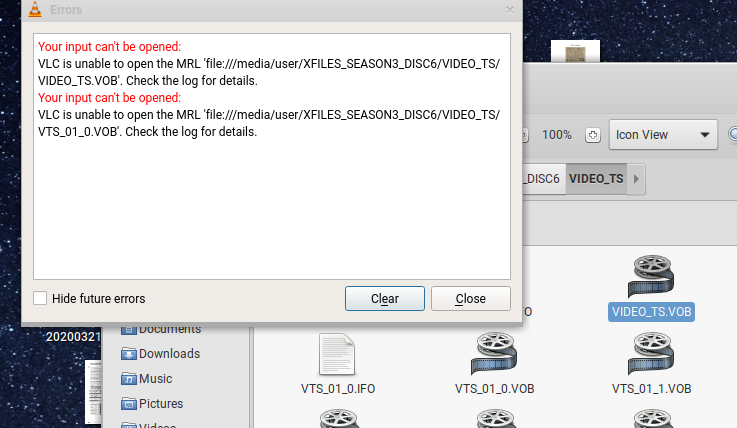


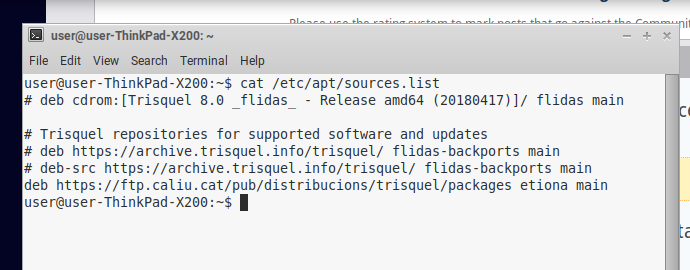
Seems you have some issues with your sources.list file, please share the output of
cat /etc/apt/sources.list
Also since it may be easier for you try to install build-essential using synaptic, and share if it succeeds.
Regards
Hi, synaptic wants the broken packages fixed first ! This version of Trisquel was originally Trisquel 8. I did the online update to 9.
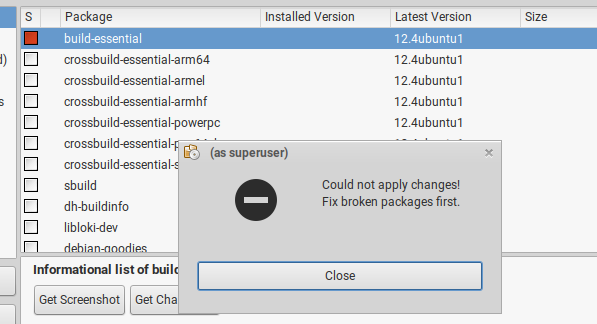
Remove build-essential (right click on the row to then mark for removal and apply) and, maybe, other broken packages that Synaptic lists if you click on "Broken", which is among the "Custom Filters" (a button in the bottom-left corner of the window).
Notice that the support of Trisquel 9 Etiona will end in April 2023: you want to plan the upgrade to Trisquel 10 Nabia.
Hello, build essential is not installed. I merely highlighted it in synaptic to show to that it can't be installed until broken packages are fixed. There are no broken packages listed in synaptic. And yet the error screen showed up when I was searching synaptic.
I already downloaded Trisquel 10, burned to a disk so I can start afresh. 9 Etiona won't update properly on X200 & X230 unless a browser is running first.
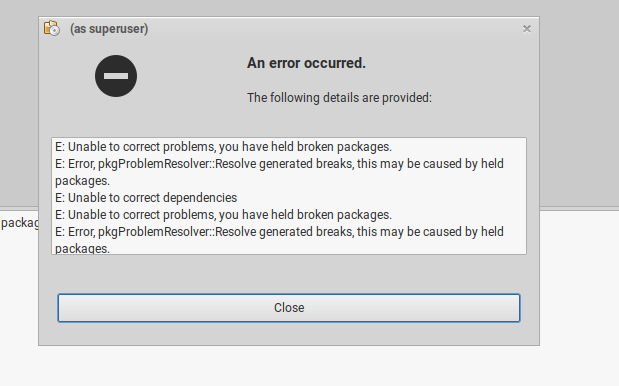
There you go, that's the issue,
The trisquel repo for any release is componed from 4 different categories,
- main
- updates
- security
- backports
By default backports is disabled, you only have main active, so that's the reason you keep having broken packages, the system requires at least the first 3.
So you want to make sure your sources list file looks like this,
deb http://archive.trisquel.org/trisquel/ etiona main

deb http://archive.trisquel.org/trisquel/ etiona-updates main

deb http://archive.trisquel.org/trisquel/ etiona-security main

#deb http://archive.trisquel.org/trisquel/ etiona-backports main

deb-src http://archive.trisquel.org/trisquel/ etiona main

deb-src http://archive.trisquel.org/trisquel/ etiona-updates main

deb-src http://archive.trisquel.org/trisquel/ etiona-security main

#deb-src http://archive.trisquel.org/trisquel/ etiona-backports main
You can use this on a terminal to do that,
echo "deb http://archive.trisquel.org/trisquel/ etiona main

deb http://archive.trisquel.org/trisquel/ etiona-updates main

deb http://archive.trisquel.org/trisquel/ etiona-security main

#deb http://archive.trisquel.org/trisquel/ etiona-backports main

deb-src http://archive.trisquel.org/trisquel/ etiona main

deb-src http://archive.trisquel.org/trisquel/ etiona-updates main

deb-src http://archive.trisquel.org/trisquel/ etiona-security main

#deb-src http://archive.trisquel.org/trisquel/ etiona-backports main" | sudo tee /etc/apt/sources.list
Then update the repo and apply all the updates and all the packages you might be missing from the other repositories.
Cheers.
You're a genius sir, the DVD is now working and so are the updates. Thankyou to all who helped.
- Inicie sesión o regístrese para enviar comentarios